



Artificial intelligence is transforming the way people create digital content. Tasks that once required professional design skills, expensive software, and hours of editing can now be completed with AI-powered tools. From realistic photographs to cinematic videos, modern AI platforms are making content creation easier for beginners and professionals.
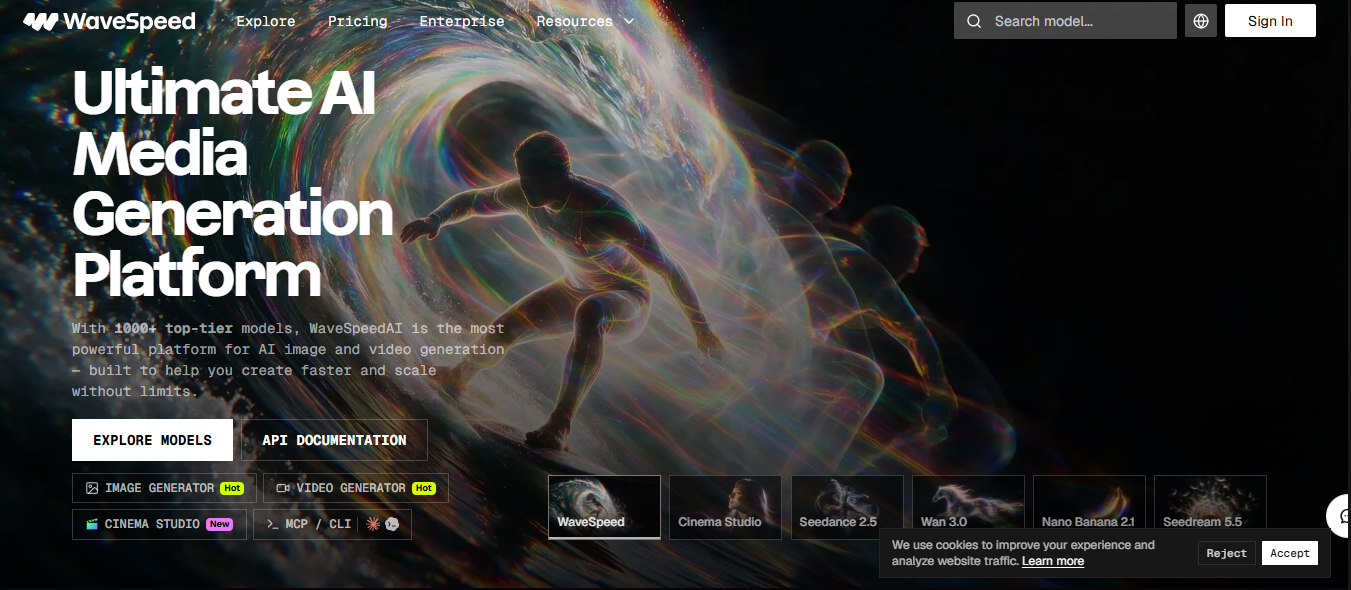
One platform gaining attention in this field is WaveSpeed AI. It provides access to different AI-powered image and video generation models, allowing users to turn simple text descriptions and images into creative visual content.
But what exactly is WaveSpeed AI? How does it work, what features does it offer, and is it suitable for beginners?
In this guide, we will explore WaveSpeed AI, its key features, practical applications, pricing considerations, advantages, and limitations to help you understand whether it is the right platform for your creative needs.
What Is WaveSpeed AI?
WaveSpeed AI is an AI-powered creative platform that allows users to generate images, videos, and other digital content using generative artificial intelligence. Instead of creating every visual element manually, users can provide text prompts or supported image inputs and let AI models generate the desired results.
The platform brings multiple AI models together in one place, making it easier to experiment with different creative tools without constantly switching between separate applications.
For example, you can describe a modern luxury house surrounded by beautiful gardens at sunset. An AI image generator can turn that description into a realistic visual. Similarly, a compatible video generation model can transform a written scene or reference image into a short animated sequence.
WaveSpeed AI can be useful for:
- Beginners: People exploring AI image and video creation.
- Content creators: Bloggers, YouTubers, and social media influencers.
- Digital marketers: Professionals creating advertisements and promotional visuals.
- Designers: Creative professionals experimenting with AI-generated artwork.
- Developers: Users building applications with AI generation capabilities.
Its main purpose is to make AI-powered content creation more accessible and flexible.
How Does WaveSpeed AI Work?
WaveSpeed AI uses generative AI models to understand user instructions and produce visual content. These models analyze patterns in images, objects, environments, artistic styles, and movements to generate new content based on the provided instructions.
The general process is straightforward.
1. Enter a Text Prompt
First, describe what you want to create. For example:
“A modern glass house beside a peaceful lake, surrounded by green pine trees, cinematic lighting, realistic photography, and a beautiful sunset.”
A detailed prompt helps the AI understand your creative requirements.
2. Choose an AI Model
Select a suitable model depending on your project. Some models specialize in realistic images, while others focus on illustrations, image editing, or video generation.
3. Adjust Generation Settings
Depending on the selected model, you may be able to customize image dimensions, aspect ratios, resolution, video duration, and other parameters.
4. Generate Your Content
Submit your prompt and allow the selected AI model to process your request. Generation time depends on the model and task complexity.
5. Review and Improve the Results
Check the generated content carefully. If the result does not match your expectations, modify your prompt, experiment with another model, or adjust the available settings.
Key Features of WaveSpeed AI
WaveSpeed AI offers several capabilities that make it useful for different creative projects.
1. AI Image Generation
One of its main features is text-to-image generation. Users can describe an image in natural language and allow an AI model to create a visual representation.
Depending on the selected model, users can generate:
- Realistic photographs and portraits.
- Digital artwork and illustrations.
- Product photography.
- Website banners and blog images.
- Social media graphics.
- Creative concept artwork.
WaveSpeed AI provides access to models such as FLUX, Seedream, and Nano Banana, offering different approaches to image generation.
2. AI Video Generation
AI video generation allows users to create short video sequences without recording every scene manually.
WaveSpeed AI supports different video-generation approaches, including text-to-video and image-to-video. Models from providers such as Kling, Wan, Seedance, and Hailuo offer different video creation capabilities.
For example, you could describe a luxury car driving along a mountain road during sunset and use a compatible model to generate a cinematic video scene.
This feature can be useful for advertisements, social media clips, product demonstrations, and creative storytelling.
3. Image-to-Image Editing
Another useful capability is image-to-image generation. Instead of starting with a blank canvas, users can upload an existing image and ask a compatible AI model to transform it.
For example, you could upload a living room photograph and request a modern interior design with brighter walls, contemporary furniture, and improved lighting.
Other applications include changing backgrounds, exploring alternative product designs, modifying artistic styles, and improving visual details.
4. Access to Multiple AI Models
One of WaveSpeed AI’s major attractions is its collection of different AI models.
Rather than depending on a single image or video generator, users can experiment with multiple models to find the best option for their projects.
According to the platform’s published information, its model library includes more than 1,000 models across image, video, audio, and other AI categories.
5. Developer API Integration
WaveSpeed AI also provides options for developers who want to integrate AI generation into websites, applications, and automated workflows.
Its API access, Python and JavaScript SDKs, and integrations with tools such as ComfyUI and n8n can help developers build AI-powered applications and automate repetitive creative tasks.
How to Use WaveSpeed AI: A Beginner-Friendly Guide
Getting started with WaveSpeed AI does not necessarily require programming knowledge. Beginners can explore its browser-based generation tools through a relatively simple process.
Step 1: Visit the Official Website
Visit the WaveSpeed AI official website and explore the available features. Create an account if required.
Step 2: Choose an Image or Video Generator
Decide whether you want to create a photograph, illustration, product image, or animated video. Select a suitable generator based on your requirements.
Step 3: Write a Detailed Prompt
Your prompt plays an important role in the final result.
For example:
“A professional product photograph of a luxury wristwatch placed on a dark marble surface, soft studio lighting, realistic reflections, elegant background, sharp details, premium commercial photography.”
Include details about the subject, background, lighting, camera angle, and visual style.
Step 4: Select Your Settings
Adjust the available options, such as aspect ratio, resolution, video duration, and reference images. Beginners can start with the default settings.
Step 5: Generate and Download Your Content
Submit your prompt and review the generated result. If necessary, improve your instructions and generate another version. Once satisfied, save your final content.
Practical Uses of WaveSpeed AI
WaveSpeed AI can support several creative and professional activities.
Content Creation and Blogging
Bloggers can generate featured images, article illustrations, and supporting graphics. For example, a home improvement blogger can create visuals of modern kitchens, renovated living rooms, and attractive outdoor spaces.
Social Media Marketing
Digital marketers can experiment with promotional graphics, product visuals, and short video advertisements for platforms such as Instagram, Facebook, and TikTok.
E-Commerce Product Images
Online businesses can use AI-generated backgrounds and promotional concepts to improve product presentation. However, generated images should accurately represent the actual products being sold.
Video Production and Storytelling
Independent creators can experiment with cinematic scenes, animated sequences, and storytelling concepts without recording every scene themselves.
Graphic Design Projects
Designers can use AI-generated artwork as a starting point for posters, presentations, advertisements, and creative concepts. Additional editing may still be necessary for professional results.
Benefits of Using WaveSpeed AI
WaveSpeed AI offers several potential advantages for individuals and businesses.
- Multiple tools in one place: Access different AI generation models through a single platform.
- Beginner-friendly options: Create images and videos without advanced programming knowledge.
- Creative flexibility: Experiment with different artistic styles and visual concepts.
- Developer support: Integrate supported AI capabilities into applications through APIs and SDKs.
- Faster experimentation: Generate multiple creative variations without designing everything manually.
- Flexible model selection: Choose models according to your project requirements and budget.
These benefits make it an interesting option for people exploring AI-assisted content creation.
Limitations to Consider Before Using WaveSpeed AI
Although AI generation platforms offer many advantages, they also have limitations.
- Inconsistent results: Generated images and videos may contain incorrect details or visual imperfections.
- Different model costs: Some advanced models, higher resolutions, and longer videos may require more credits.
- Prompt-writing skills: Beginners may need practice to produce accurate results.
- Manual editing: Professional projects may require additional corrections and quality checks.
- Commercial licensing: Users should review platform terms, model-specific licensing conditions, and privacy policies before using generated content commercially.
Understanding these limitations can help users make better decisions.
WaveSpeed AI Pricing: Is It Free or Paid?
Pricing is an important consideration when choosing an AI generation platform.
WaveSpeed AI uses a model-based usage pricing approach. The cost of generating content can vary depending on the selected model, output quality, resolution, video duration, and processing requirements.
Some eligible accounts may receive trial credits or promotional access. However, users should not assume that every model is free.
Before purchasing credits or generating large amounts of content, check the official WaveSpeed AI website for the latest pricing information and available account options.
WaveSpeed AI vs Traditional Content Creation Tools
WaveSpeed AI and traditional creative software offer different approaches to producing digital content.
| Feature | WaveSpeed AI | Traditional Tools |
| Image creation | AI-generated | Mostly manual |
| Video creation | AI-generated sequences | Manual production |
| Creative control | Prompt and model-based | Detailed manual control |
| Technical skills | Vary by task | Often require software knowledge |
| Editing | Model-dependent | Extensive editing options |
| Best for | AI-assisted creation | Precise creative production |
Neither approach is automatically better for every project. AI tools can speed up experimentation, while traditional software remains valuable for detailed editing and professional finishing.
Tips for Getting Better Results With WaveSpeed AI
If you are new to AI image and video generation, these practical tips can improve your experience:
- Write specific prompts: Describe the subject, environment, lighting, and visual style.
- Choose the right model: Different models are designed for different creative tasks.
- Experiment with settings: Test different aspect ratios and resolutions.
- Use reference images: Provide visual guidance whenever the selected model supports it.
- Generate multiple variations: Compare different results before selecting your favorite.
- Review every output: Check visual accuracy and quality before publishing.
- Monitor your spending: Understand model-specific pricing to avoid unexpected costs.
Is WaveSpeed AI Worth Trying?
WaveSpeed AI is worth exploring if you want access to multiple AI image and video generation models through one platform.
Its combination of browser-based creative tools, model selection, and developer integrations makes it relevant to beginners, designers, digital marketers, and developers.
However, the right choice depends on your requirements. Someone who occasionally creates social media graphics may prefer a simple image generator, while a developer building an AI-powered application may benefit from its API capabilities.
The best approach is to test suitable models, compare their results, and evaluate the pricing before using the platform for larger projects.
Frequently Asked Questions (FAQs)
1. What is WaveSpeed AI used for?
WaveSpeed AI is used to generate images, videos, audio, and other digital content using artificial intelligence. It also provides API access for developers.
2. Is WaveSpeed AI beginner-friendly?
Yes. Its browser-based generation tools allow beginners to create content using text prompts without programming knowledge.
3. Can WaveSpeed AI generate images from text?
Yes. It supports text-to-image generation through different AI models, allowing users to turn written descriptions into visual content.
4. Can WaveSpeed AI create videos from images?
Yes. Compatible image-to-video models can animate still images and transform them into video sequences.
5. Does WaveSpeed AI offer an API?
Yes. Developers can use its API, Python and JavaScript SDKs, and supported integrations to build AI-powered applications.
6. Is WaveSpeed AI free to use?
Pricing and trial availability depend on account eligibility and the selected model. Check the official website for current details.
Final Thoughts
WaveSpeed AI represents an interesting development in AI-powered image and video generation. By bringing multiple generative AI models and creative tools together, it gives users more opportunities to experiment with digital content production.
For beginners, it offers an accessible way to explore AI-generated visuals without learning complicated editing software immediately. For professionals and developers, its model library and API capabilities provide additional possibilities for creative workflows and application development.
Although AI generation still requires effective prompting, careful reviewing, and sometimes manual editing, platforms like WaveSpeed AI can make content creation faster and more flexible.
If you want to explore artificial intelligence for visual content creation, WaveSpeed AI is worth trying.