


Introduction
Modern vehicles increasingly rely on cameras, radar sensors, and other advanced driver assistance systems (ADAS) to support functions such as lane departure warning, adaptive cruise control, and collision-related driver alerts.
Those systems depend on precise sensor alignment. After certain repairs, component replacements, wheel alignment work, windshield replacements, or manufacturer-specific procedures, an ADAS sensor may need to be calibrated so that the vehicle can correctly interpret its surroundings.
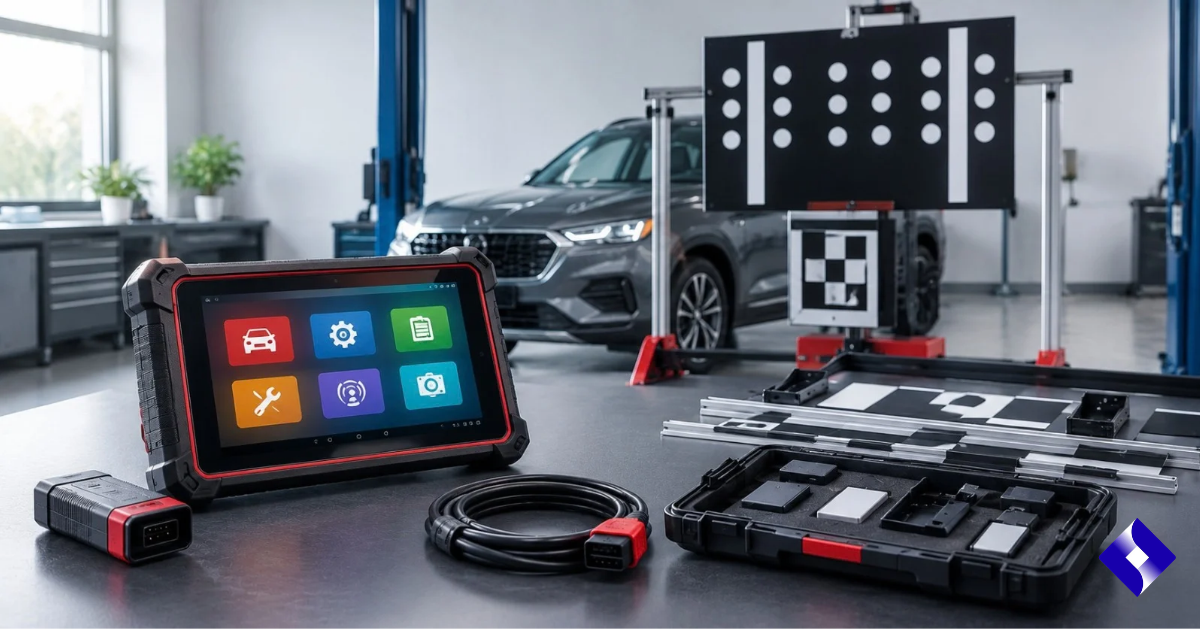
The Launch Tech X-431 ADAS Mobile Package is designed to provide technicians with a portable framework to perform assisted ADAS calibration procedures. Rather than acting as a simple diagnostic scanner, it combines physical calibration equipment with compatible Launch Diagnostic hardware and software.
Launch describes its ADAS mobile platform as a foldable calibration solution that aims to make the equipment easy to transport and set up. The current Mobile Plus equipment continues the portability-focused approach with foldable arms, positioning tools, leveling devices and laser-based measurement features.
This guide explains what the system does, what its common components are, how calibration works, and what technicians should understand before using it.
Table of contents
- What is Launch Tech X-431 ADAS Mobile Package?
- Why is ADAS calibration necessary?
- What is included in the package?
- How does the X-431 ADAS Mobile System work?
- Key Features
- Which ADAS systems can help calibrate?
- When might ADAS calibration be needed?
- Benefits of Mobile ADAS Calibration System
- Important setup requirements
- Advantages and disadvantages
- Frequently Asked Questions
- Key Takeaways
- Conclusion
What is Launch Tech X-431 ADAS Mobile Package?
The Launch Tech X-431 ADAS Mobile Package is an ADAS calibration solution aimed at workshops and technicians who need to accurately position calibration targets in relation to the vehicle.
Its physical frame holds the appropriate calibration target or pattern at the manufacturer’s specified height, distance, and orientation. A compatible Launch diagnostic tablet then communicates with the vehicle and guides the technician through the assisted calibration procedure.
Launch’s diagnostic documentation explains that its ADAS software can be used for camera- and radar-based assistance systems, including front cameras used for lane departure systems and radar sensors associated with adaptive cruise control. The physical target-dependent method requires calibration hardware separate from the diagnostic software.
In other words, the frame does not calibrate the vehicle itself. It creates the accurately measured reference environment that the vehicle’s ADAS sensors need during the static calibration procedure.
Why is ADAS calibration necessary?
ADAS cameras and radar units must know where the vehicle is parked relative to the road and surrounding objects.
Even a relatively small alignment error can change the way the sensor interprets its view. For this reason, manufacturers specify calibration procedures when particular components have been repaired, replaced, removed, adjusted, or otherwise disturbed.
Static ADAS Calibration
Static calibration usually occurs when the vehicle is stationary.
A technician places a specific pattern or target in front of, behind, or around the vehicle, according to the manufacturer’s instructions. The diagnostic system then begins a calibration routine while the vehicle’s sensors look at this reference.
This is the type of operation for which the ADAS calibration frame is particularly important.
Dynamic ADAS Calibration
Some vehicles instead require dynamic calibration, where the vehicle is driven under varying road and environmental conditions.
Other vehicles may require a combination of static and dynamic procedures. The exact procedure depends on the vehicle, so the exact year, make, model, equipment configuration, and service information for the ADAS system should determine the procedure.
What is included in the Launch Tech X-431 ADAS Mobile package?
The exact content depends on whether the equipment is the original X-431 ADAS Mobile setup, the new Mobile Plus version, or a distributor-specific bundle.
Therefore, technicians should verify the part number rather than assuming that each package contains the same hardware.
the X-431 ADAS Mobile Plus identifies items including:
| Component | Purpose |
| Mobile Plus Mainframe | Place and position calibration targets. |
| Cross laser | Helps establish correct positioning. |
| Rangefinder | Calibration measures distance or positioning. |
| Five-line laser device | Helps with vehicle/frame alignment. |
| Laser reflector | Used during positioning procedures |
| Auxiliary mirror | Reference helps establish positioning. |
| Positioning bracket | Helps with alignment. |
| Plumb line | Helps identify vehicle center/reference points. |
| Tape measure | Used for dimensional setup. |
| Cross stickers | Provides reference marking points. |
| User Manual | Setup and operational guidance |
| Activation PIN card | Used for auxiliary ADAS software activation. |
Launch’s current Mobile Plus system also includes foldable arms, a digital laser height meter, a dual-axis bubble level, four locking swivel casters with leveling pads, and a weight list of about 50 pounds.
What about calibration targets?
Targets or pattern boards are important because different manufacturers and ADAS systems use different visual references.
The original X-431 ADAS was offered with manufacturer-specific calibration target support through Mobile Launch, while current-day packages may offer different target selections or configurations.
This is why target coverage should always be checked against the vehicles the workshop is actually servicing.
A list simply described as an “ADAS mobile package” should not be assumed to automatically include every available manufacturer target.
How does the Launch Tech X-431 ADAS Mobile Package work?
The calibration process combines three elements:
Vehicle diagnostics, accurate physical positioning, and manufacturer-specific calibration routine.
The exact instructions vary depending on the vehicle, but the general workflow can be understood in several steps.
1. Connect the diagnostic tool.
A compatible Launch X-431 diagnostic platform communicates with the vehicle through its diagnostic interface.
The technician selects the appropriate vehicle and enters the ADAS calibration function. The launch documentation notes that the ADAS calibration software may require activation before it is available on the Actiable scanner.
The system then provides the procedure applicable to the selected vehicle.
2. Check the vehicle’s prerequisites.
The technician must verify that the vehicle meets the conditions required for calibration.
Depending on the manufacturer, these requirements may include tire pressure, steering position, suspension condition, vehicle loading, ride height, fuel level, diagnostic trouble codes, wheel alignment, or other factors.
Calibration should not be used to compensate for an underlying mechanical problem.
3. Determine the centerline of the vehicle.
One of the most important steps is to correctly identify the geometric relationship between the vehicle and the calibration equipment.
The X-431 ADAS Mobile manual describes the vehicle centerline as the first major step in positioning. Its documented process uses tools including plumb lines and laser devices to establish accurate reference points.
4. Position the calibration frame
Next, the frame is positioned at the distance required for the vehicle’s specific procedure.
This measurement should not be estimated.
Different manufacturers, models, cameras, and procedures may require different distances and references. The technician follows the dimensions displayed by the diagnostic software or specified in the applicable service information.
5. Align the frame with the vehicle.
Just the correct distance is not enough.
The calibration frame also needs to be centered, level, and correctly oriented relative to the vehicle.
The documented launch workflow includes positioning the tool, aligning it with the vehicle, selecting the appropriate calibration target, and adjusting the target height.
6. Install the correct target.
The technician installs a target or pattern specific to the vehicle.
Using a visually similar target is not an acceptable alternative. ADAS calibration targets are engineered reference patterns that are recognized by specific vehicle camera systems.
7. Adjust the target height.
The target should then be placed at the desired height.
Current Mobile Plus hardware includes a digital laser meter for devices designed to support target height measurement and accurate positioning.
8. Start the calibration routine.
After confirming all measurements, the technician begins calibration via the diagnostic tablet.
The vehicle’s ADAS control module then observes the target or performs the procedure specified by the manufacturer.
9. Confirm completion.
The technician should verify that the calibration routine reports successful completion.
Depending on the vehicle, additional tasks may include clearing relevant fault codes, conducting a road test, completing a dynamic calibration, or verifying ADAS operation according to the manufacturer’s instructions.
Key Features of Launch X-431 ADAS Mobile System
Portable and foldable construction
Portability is one of the clear ideas behind the X-431 ADAS mobile platform.
The original model was designed with a foldable base and arms, while the current Mobile Plus uses foldable arms to reduce its footprint during storage and transportation.
This may be particularly suitable for technicians who do not have a permanent calibration bay.
Laser Assisted Positioning
Laser-based measurement tools help technicians establish the desired relationship between the calibration frame and the vehicle.
However, lasers do not eliminate the need to follow service information. They are intended to improve measurement repeatability and accuracy.
Adjustable target height
ADAS targets often need to sit at a specific height relative to the vehicle or the floor.
Adjustable frames and measurement tools allow the target position to be changed for different vehicle procedures.
Leveling ability
A calibration stand placed on an unsuitable or uneven surface can introduce errors.
The current Mobile Plus design includes leveling features including leveling pads and a dual-axis bubble level to help the operator properly establish the frame.
Integration with compatible launch diagnostic tools
Launch lists several professional diagnostic tools compatible with its existing ADAS Mobile Plus devices, including Throttle V, Torque Link, and Turbo III.
The launch documents also reveal the broader historical compatibility between X-431 diagnostic platforms and ADAS hardware.
However, compatibility must be confirmed for the specific tablet, software subscription, ADAS package, and coverage for the vehicle being used.
Which ADAS systems can help calibrate?
Assisted calibration depends primarily on the vehicle, software coverage, targets, and package configuration, rather than just the frame.
Examples of systems that may include ADAS calibration:
| ADAS system | Common sensor |
| Lane departure warning | Front-facing camera |
| Lane Keeping Assistance | Front camera |
| Adaptive cruise control | Radar and/or camera |
| Forward collision warning | Camera/Radar |
| Automatic emergency braking | Camera/Radar |
| Adaptive headlight functions | Camera/Sensor |
| Rear camera systems | Rear camera |
| Surveillance of the surroundings | Multiple cameras |
The launch specifically documents its ADAS diagnostic module, which provides support for calibration procedures for cameras used in lane-departure front cameras, adaptive-cruise-control radar, and adaptive-lighting functions.
This does not mean that every vehicle using these technologies is automatically covered. Technicians should verify software and target coverage before accepting calibration work.
When might ADAS calibration be needed?
Calibration requirements vary considerably depending on the manufacturer.
Nevertheless, technicians may encounter the need for calibration in the following tasks:
- Windshield replacement;
- Removing or replacing the ADAS camera;
- Radar sensor replacement;
- Some collision repairs;
- Structural repairs to the front end;
- Suspension repair;
- Wheel alignment;
- Change in ride height;
- Steering related procedures;
- Removing the bumper or grille where the sensors are mounted;
- Control module replacement; or
- Service procedures specified by the manufacturer.
The important point is that calibration should be determined from OEM service information rather than assuming it from a generic checklist.
For example, replacing a windshield may require calibration on one vehicle but follow a different procedure on another.
Benefits of Mobile ADAS Calibration System
More flexibility
A mobile frame can be easier to move between service areas than a large fixed calibration structure.
For independent repair shops, glass installers, collision facilities, and mobile ADAS specialists, this can provide greater flexibility when physical workspace is limited.
More organized calibration setup
ADAS calibration requires multiple measurements.
Having a specific frame, alignment system, target mounting method, and diagnostic workflow helps technicians establish a repeatable process rather than just optimizing target positioning.
Support for multiple vehicle brands
The Launch diagnostic platform covers domestic, Asian and European vehicles, while ADAS functionality extends to supporting manufacturer-specific calibration procedures.
Actual coverage still depends on the diagnostic tool, software version, targets, and vehicle.
Integration with existing diagnostic tools
A workshop already using a compatible X-431 platform can integrate the calibration hardware into its existing diagnostic workflow rather than maintaining a completely separate diagnostic ecosystem.
Important setup requirements before calibration
Owning the equipment is only part of performing ADAS calibration correctly.The surrounding environment also matters.
Suitable workplace
Static calibration requires sufficient distance around the vehicle to place the pattern in a specific location.
The required dimensions vary depending on the vehicle and calibration type.
Suitable floor surface
The workstation floor can affect target height, vehicle attitude, and frame alignment.
The launch calibration documentation includes the workstation ground conditions among the preconditions that need to be considered before calibration.
Proper lighting
Cameras must be able to reliably identify calibration patterns.
Excessive glare, shadows, reflections, or inappropriate lighting can interfere with some camera calibration procedures. Therefore, the Launch documentation considers workstation lighting as part of the calibration environment.
Fix the condition of the vehicle.
ADAS calibration should generally only be performed after addressing related mechanical and structural issues.
The vehicle must meet the manufacturer’s specified conditions before calibration can begin.
Current vehicle information
Technicians should use the current service procedures for the specific vehicle.
Measurements and instructions for another model year or apparently similar vehicle should not be changed without verification.
Advantages and disadvantages of LaunchTech X-431 ADAS Mobile Package
| Profession | Cons |
| Foldable design improves portability. | Adequate workspace is still required for proper calibration. |
| Laser-assisted positioning can improve setup accuracy. | Target packages may vary between configurations. |
| Designed to work with compatible Launch X-431 tools. | Diagnostic hardware may be required separately. |
| Supports manufacturer-specific calibration workflows. | Software activation or subscriptions may be required. |
| Adjustable frame works with different target positions. | Operator training and measurement accuracy are important. |
| Mobile design can be tailored to shops without permanent ADAS bays. | Not every vehicle or ADAS system is automatically supported. |
| Leveling and measuring tools support repeatable setup. | Static calibration equipment cannot replace OEM procedures. |
The important consideration is that portability does not make ADAS calibration comfortable or approximate.
A mobile frame still requires the same disciplined measurement, vehicle preparation, environmental control, and procedural verification expected of any professional calibration operation.
Frequently Asked Questions
- What is the best Launch scan tool?
The best Launch scan tool depends on the workshop’s needs, vehicle coverage, and desired functions. Professional models such as the X-431 Throttle, Torque, and PAD series tools are designed for advanced diagnostics, coding, service functions, and supporting ADAS work. - What is the latest Launch diagnostic tool?
Launch regularly updates its X-431 diagnostic lineup, so the latest model may vary depending on the market and product category. It is best to check Launch Tech’s current product range to confirm the latest scanner available for professional diagnostics. - How do you use the Launch X431 scanner?
Connect the X-431 interface to the vehicle’s OBD-II port, turn on the ignition, and select or automatically identify the vehicle in the diagnostic software. From there, technicians can scan control modules, read and clear fault codes, view live data, and access supported service functions. - What is the best Launch scan tool for professional use?
For professional workshops, the best option is usually a high-end X-431 model that supports wide vehicle coverage, two-way testing, coding, and advanced diagnostic functions. The right choice should also match the types of vehicles and the repair work the shop handles. - Is the Launch Diagnostic Tool any good?
Launch diagnostic tools are widely used by independent workshops because they offer a wide vehicle coverage and a robust range of diagnostic and service functions. Performance and available features depend on the specific model, software package, and vehicle being tested.
Key Takeaways
The LaunchTech X-431 ADAS Mobile Package is intended as a precision positioning and calibration platform rather than a stand-alone diagnostic device.
Its purpose is to help technicians accurately target ADAS at the correct height, distance, centerline, and orientation while the compatible Launch diagnostic software communicates with the vehicle.
The most important points to remember are:
- ADAS calibration is vehicle and procedure specific.
- The calibration frame works with compatible diagnostic hardware and software.
- Package contents and target coverage may vary.
- Accurate centerline, distance, leveling, and target height are essential.
- Camera and radar calibration requirements are not the same across all vehicles.
- Work space, lighting, floor conditions, and vehicle preparation can affect the procedure.
- OEM service information should determine when and how calibration is performed.
- Successful calibration requires both proper equipment and proper technicians.
Conclusion
The increasing use of cameras, radar sensors, and automated driver assistance functions has made calibration a critical part of modern vehicle repair.
The Launch Tech X-431 ADAS Mobile Package addresses these needs through a portable calibration frame, measurement tools, target mounting hardware, and integration with compatible Launch diagnostic platforms.
Its strongest practical feature is portability. Foldable hardware and measurement instruments make the system easier to move and position than some larger fixed calibration structures, while still allowing the technician to establish the accurate references needed for the auxiliary static calibration procedure.
However, the equipment itself is only one part of the process. Accurate ADAS calibration depends on proper vehicle preparation, proper operating conditions, accurate targeting, current software coverage, accurate measurements, and adherence to the vehicle manufacturer’s procedures.
For technicians evaluating an X-431 ADAS Mobile setup, the most useful question is therefore not simply “What comes in the box?” but whether the specific package, goals, diagnostic platform, software coverage, workspace, and training collectively support the vehicles they want to calibrate.
The draft was checked for grammar, readability, keyword repetition, headline structure, search intent, and unsupported product claims. I also kept the core keywords natural rather than forced into each section.