

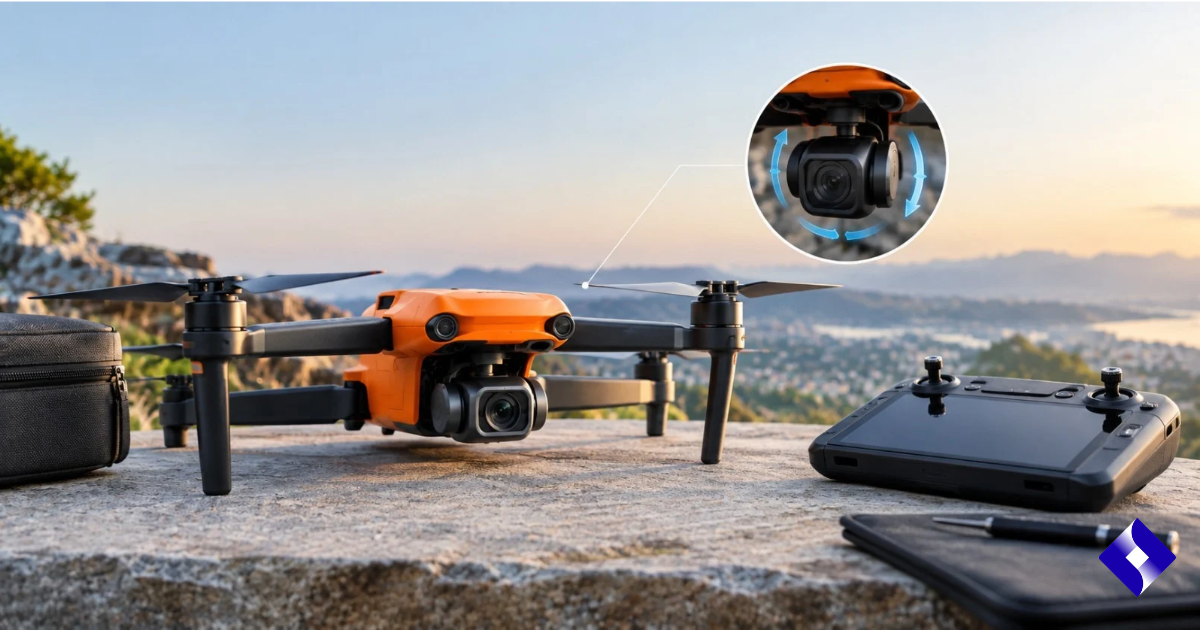

A shaky drone camera can quickly turn otherwise useful aerial footage into blurry, unstable video. If you’re experiencing vibration, sudden gimbal movement, an uneven horizon, or footage that doesn’t look properly stabilized, the problem doesn’t always mean the camera hardware has failed.
The Autel Robotics Evo Lite Enterprise 6k gimbal uses three-axis stabilization and is designed to keep the camera steady during aircraft movement. Autel lists its angular vibration range at ±0.003°, so persistent shaking is something to investigate rather than treating as normal behavior.
In many cases, the cause is relatively simple: incorrect starting conditions, calibration issues, bad dampeners, debris around the gimbal, environmental vibrations, or outdated software.
This guide explains how to identify the likely cause and what you can safely check before considering professional repairs.
Why is Autel EVO Lite Enterprise Gimbal shaking?
Gimbal shake usually occurs when the stabilization system is struggling to keep the camera aligned with the aircraft.
The EVO Lite 6K Enterprise gimbal uses separate pitch, roll, and yaw motors. These motors compensate for the constant movement of the drone as it flies. The camera assembly also uses damping components that are designed to isolate it from aircraft vibrations.
When something interferes with this system, the camera may turn, vibrate, move, or repeatedly try to correct its position.
Here are the most common possibilities.
| Possible cause | What you may notice. | Recommended checks |
| Gimbal calibration problem | The camera shakes or repeatedly corrects itself. | Run gimbal calibration. |
| Uneven starting surface | The horizon appears tilted or unstable. | Restart at the surface level. |
| Dampener damaged | Continuous fine vibration in footage | Inspect the gimbal mounting points. |
| Dirt or obstruction | The gimbal’s movement feels limited. | Inspect around the camera assembly. |
| Airplane vibration | The shaking increases during the flight. | Check the condition of the propellers and the aircraft. |
| IMU calibration problem | Horizon drift or unusual stability | Check IMU calibration. |
| Strong wind. | Temporary movement while hovering | Test again in calm conditions. |
| Gimbal motor problem | Recurrent twitching or unusual movements | Stop using the gimbal and seek help. |
| Software or firmware problem | The problem appears after an update or configuration change. | Check the current firmware and restart. |
Can gimbal calibration fix shaking?
When there is no obvious physical damage, calibration should be one of the first things you check.
According to Autel’s EVO Lite Enterprise manual, the gimbal is calibrated during manufacturing and typically does not require frequent user calibration. However, if the flight application displays a message asking you to calibrate the gimbal motor, Autel provides an automatic calibration procedure.
Before starting calibration, place the aircraft on a stable, flat surface.
The drone must remain stationary during the calibration process. Do not hold the aircraft in your hand or move it while the gimbal is adjusting itself.
| Calibration step | What to do? |
| 1 | Place the drone on a flat, stable surface. |
| 2 | Power on the aircraft and remote controller. |
| 3 | Open the flight request. |
| 4 | Go to the gimbal calibration controls. |
| 5 | Start automatic calibration. |
| 6 | Keep the aircraft completely still. |
| 7 | Wait until the application confirms successful calibration. |
| 8 | Restart the aircraft and test the camera again. |
Otell specifically states that calibration should be performed while the aircraft is stationary.
Why does a flat surface make a difference during startup?
A surprisingly common cause of strange camera behavior is powering the drone on an uneven surface.
The aircraft’s stabilization system requires an accurate reference point when starting. Starting while the drone is tilted can contribute to uneven horizons or incorrect orientation readings.
Autel’s support guidance for gimbal horizon issues recommends powering the aircraft to the highest available level.
A simple test can therefore save a lot of time in troubleshooting.
Place the aircraft on a solid, level surface, restart it, let the starting process finish without moving the drone, and then check if the shaking remains.
Can gimbal dampeners cause vibration?
Yes
The Autel Robotics Evo Lite Enterprise 6k gimbal assembly includes a dampener mount that supports the damping system and camera.
These components help prevent vibrations from the aircraft body from reaching the camera.
If the dampener becomes loose, displaced, worn, or damaged, small vibrations of the aircraft may be visible in your footage.
Common symptoms include a fine, constant vibration, footage that looks slightly blurry despite accurate focus, shaking that gets stronger as the motors speed up, or a gimbal that seems physically loose.
Carefully inspect the mounting area without pulling, twisting, or forcing the gimbal.
If anything appears torn, disconnected, or improperly seated, avoid attempting repairs that could damage the motors or camera assembly.
Can propeller problems cause gimbal shake?
Not every apparent gimbal problem actually starts with the gimbal.
Damaged, bent, improperly installed, or unbalanced propellers can introduce additional vibrations into the aircraft. The stability system then has to work harder to isolate this motion.
This is especially worth checking when the camera appears stable before takeoff but starts shaking once the motors are running.
| Condition | Possible meaning |
| The gimbal moves while the aircraft is moving but the motors stop. | Gimbal, calibration, mounting, or software issue is more likely |
| The motors start to vibrate when they start. | Aircraft vibration or propeller condition may contribute. |
| Shaking increases during aggressive movements. | Flight vibration or stability limitations may be involved. |
| The camera tilts even while sitting still. | Calibration, obstruction, or gimbal motor issue deserves attention. |
Do not fly with visibly cracked or badly damaged propellers.
Can dirt or debris interfere with gimbal movement?
The gimbal requires freedom to move through its normal operating range.
Small pieces of debris, transport material, dirt, or any other obstruction around moving joints can interfere with this movement.
Before applying power to the aircraft, visually inspect the area around the camera and gimbal axis.
Do not force the camera beyond its range of motion with your hands. Gimbal motors and internal mechanisms are precision components, and unnecessary force may cause additional damage.
The EVO Lite 6K Enterprise has mechanical movement in its pitch, roll, and yaw axes, so clear movement around these axes is essential.
What if the horizon tilted instead of moving?
A tilted horizon and a shaking gimbal may look similar in recorded footage, but they are not exactly the same problem.
A tilted horizon usually means that the image remains relatively stable but appears angled to one side.
Otell describes this type of problem as horizon tilt and recommends starting the aircraft on a level surface before considering additional adjustments or calibration.
If the problem persists, testing the IMU may also be relevant as the aircraft’s orientation data helps the stabilization system understand the drone’s behavior.
Autel’s guidance explains that the IMU information helps the gimbal determine how the aircraft is oriented so it can maintain a level image.
Should you calibrate the IMU too?
Not automatically.
If the only symptom is a minor gimbal vibration, start with basic physical testing and gimbal calibration first.
However, IMU calibration may be worth investigating when the shaking is accompanied by a continuous drift of the horizon, unusual aircraft behavior, repeated stability errors, or calibration warnings.
Autel provides a dedicated IMU calibration procedure for the EVO Lite Enterprise series and recommends carefully following the instructions shown in the flight application.
Avoid repeatedly calibrating different sensors without identifying the symptom you are trying to resolve. Calibration should be a troubleshooting exercise, not a routine experiment.
Can wind cause camera shake?
Strong or turbulent winds can make an aircraft work harder to maintain position.
A properly operating gimbal should compensate for normal aircraft movement, but harsh conditions can easily cause fundamental vibrations or stability issues to become noticeable.
If the shaking only appears outdoors in strong winds, do another controlled test in safe, calm conditions.
If a single vibration appears while hovering in mild conditions, the cause is most likely aircraft vibration, mounting, calibration, or the gimbal itself.
Should you check the firmware?
Firmware should be part of the troubleshooting process when there is no apparent physical problem.
Gimbal behavior depends on communication between multiple systems within the aircraft. Autel has previously released firmware updates that include improvements to gimbal calibration and anti-vibration performance on its EVO platforms, demonstrating that software can affect stabilization behavior.
For EVO Lite Enterprise, use the firmware and application versions currently recommended by Autel for your specific aircraft.
After the update, restart the aircraft and controller before testing the gimbal again.
When should you stop troubleshooting the gimbal yourself?
Basic inspection, restarting, calibration, and checking for obvious obstructions are reasonable first steps.
The physical disassembly is different.
You should consider official support or qualified repair if the gimbal makes grinding or clicking noises, shakes violently immediately after startup, cannot complete calibration, has visible damage to the bearing, hangs improperly from its mounting system, exhibits repeated motor errors, or cannot move normally beyond its expected range.
Autel’s platform documentation acknowledges failed and ongoing gimbal calibration states, so repeated calibration failures should not simply be ignored.
Continuing to power a mechanically limited gimbal can put additional stress on its motors.
Quick diagnosis: What should you check first?
Use this sequence to narrow down the problem without changing too many things at once.
| Order | Check. | What are you looking for? |
| 1 | Remove the transport protection. | Nothing should obstruct the movement of the gimbal. |
| 2 | Inspect the camera and gimbal. | No debris or visible damage. |
| 3 | Inspect the aircraft and propellers. | There is no obvious source of the excessive vibration. |
| 4 | Restart at the surface level. | Proper start |
| 5 | Test while standing still. | Determine if the motors are causing vibration. |
| 6 | Perform gimbal calibration if necessary. | Correct stability alignment |
| 7 | Check IMU symptoms. | Dismiss problems related to orientation. |
| 8 | Verify software and firmware. | Ensure compatible current version |
| 9 | Conduct a safe hover test. | Compare behavior in flight. |
| 10 | If shaking continues, get help. | Possible mechanical or electronic fault |
Frequently Asked Questions
Is Autel Robotics a Chinese company?
Yes, Autel Robotics Co., Ltd. is registered in Shenzhen, Guangdong, China, where it carries out drone design and manufacturing activities. The company also maintains operations in the United States.
How much does an Autel drone cost?
Autel drone prices vary depending on the model and intended use. For example, the EVO Lite+ is listed at around $1,149, while the EVO Lite 6K Enterprise is listed at around $1,579 on the Autel official store.
Is the Ootel a good drone?
Ootel drones offer features like high-resolution cameras, stabilized gimbals, long flight times, and enterprise-focused options. Whether an Ootel drone is suitable depends on your needs, including photography, inspection, mapping, or professional operations.
Has the Autel EVO II been discontinued?
The EVO II line has evolved through multiple versions rather than disappearing completely. Autel’s official store still lists the EVO II Pro, RTK, Enterprise, and Dual 640T V3 models, although some older EVO II products and accessories have been sold out.
Which is better, Autel or DJI?
No brand is universally better because the right choice depends on factors such as camera requirements, flight characteristics, software ecosystem, enterprise capabilities, and budget. Comparing specific Autel and DJI models is more useful than comparing the two brands as a whole.
Final thoughts
A shaking Autel Robotics Evo Lite Enterprise 6k Gimbal does not automatically mean that the camera needs to be replaced.
Start with the simplest causes. Check that nothing is blocking the gimbal, inspect the aircraft and propellers, restart the drone on a level surface, and determine if the vibration occurs before or after the motors start. If appropriate, perform a formal gimbal calibration procedure and check if the orientation-related symptoms suggest an IMU issue.
Most importantly, change one thing at a time. This makes it much easier to identify the root cause rather than temporarily masking the symptoms.
If the gimbal continues to shake after calibration and basic inspection, especially when there is visible damage, unusual noise, limited movement, or repeated calibration failures, a professional inspection is safer than physically dismantling the camera assembly.
Also read: How is AVHSD transforming classroom education into a fire service career?