



Introduction
Creating visual content often requires more than just a good idea. Designers, marketers, creatives, and small businesses may need to create images, edit visuals, create short videos, and adapt content for different platforms. Traditional workflows can make these tasks time-consuming, especially when multiple versions are required.
AI-powered creative tools are changing how people approach these challenges. Pica AI is part of this broader shift toward using artificial intelligence to create and edit visual content.
Understanding where Pica AI fits into a creative workflow is more useful than just looking at individual features. It can help users determine which tasks could benefit from AI assistance, where human creativity remains important, and what limitations to consider before relying on automated tools.
Table of contents
- What is Pica AI?
- How Pica AI fits into the creative workflow
- Key features of Pica AI
- Common uses for Pica AI
- Benefits of using AI for visual content
- Advantages and disadvantages
- Things to consider before using Pica AI
- Frequently Asked Questions
- Conclusion
- Key Takeaways
What is Pica AI?
Pica AI refers to an AI-based visual creation platform designed to help users work with images and other types of digital content. Like many modern generative AI tools, it aims to reduce some of the manual work involved in creating or editing visual content.
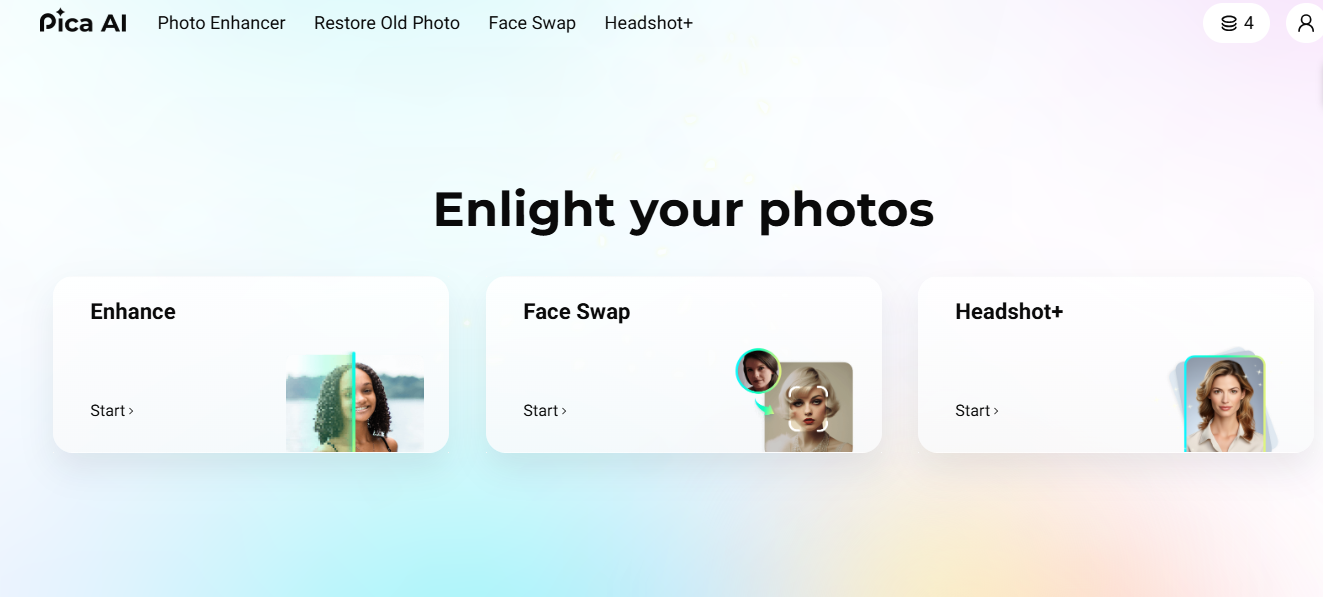
Instead of starting each project completely from scratch, users can use AI-powered functions to experiment with visual concepts and make changes quickly. The exact capabilities available may depend on the platform’s current tools, plans, and updates.
The important point is that AI doesn’t necessarily replace the creative process. In many workflows, it serves as an additional tool that helps users move more efficiently from an idea to an initial visual result.
How Pica AI fits into the creative workflow
A typical creative workflow might include brainstorming, initial concept formation, editing, reviewing, resizing, and preparing the final asset for publication. AI could potentially assist in many of these steps.
For example, a creator can start with a written idea and use an AI-powered tool to explore different visual directions. The creator can then review the results, make adjustments, and combine the AI-generated elements with traditional editing techniques.
This approach is especially useful when experimentation is important. Instead of spending significant time manually developing each variation, creators can generate multiple possibilities and decide which direction deserves further refinement.
From idea to visual concept
The biggest challenge in visual production is translating an abstract idea into something tangible. AI image tools can provide a starting point that helps creators explore composition, style, subject matter, and visual themes.
The first result doesn’t always have to be the final version. Instead, it can serve as a visual draft that gives the creator something to test and improve.
Supporting repetitive tasks
Some creative projects involve frequent adjustments. Creating variations, modifying existing visuals, or adapting assets for different purposes can be time-consuming when completed manually.
AI-assisted workflows can help reduce some of this repetitive work, allowing creators to focus more on decisions that require human judgment.
Key features of Pica AI
The available capabilities of Pica AI may change as AI platforms are updated, but its broader role can be understood through several general categories of AI-assisted visual creation.
AI image creation
Text-to-image technology allows users to describe a visual concept and get an AI-generated image based on that description. This can be useful for brainstorming, concept development, illustration, and other creative applications.
The quality of the output depends heavily on the instructions provided and the complexity of the requested image.
Image editing
AI-assisted editing can make it easier to make some changes to existing images. Depending on the specific tool, this may include modifying visual elements, improving an image, or creating variations on an existing concept.
However, AI editing should still be carefully evaluated as automated changes can sometimes produce unexpected details.
Video and motion content
AI is increasingly being used to create or transform short-form visual content. Tools in this category can help creators experiment with motion and video concepts without relying entirely on traditional production methods.
For social media creators, this can be especially useful during the early stages of content development.
Creative experience
Another important feature of AI tools is the fast experience. Users can explore different concepts without devoting significant time to each one.
This makes AI especially useful during brainstorming and prototyping and not just during final production.
Common uses for Pica AI
Pica AI could potentially fit into many types of creative tasks.
Content creation: Bloggers and publishers can use AI-assisted visuals when creating supporting graphics for articles and online content.
Social Media: Creators can experiment with visual concepts for posts, campaigns, and short-form content.
Marketing: Businesses can explore different creative directions for promotional campaigns and digital assets.
Concept development: Designers can use the generated visuals as reference when exploring ideas before creating polished assets.
Personal Projects: Individuals can experiment with AI-generated imagery without the need for advanced design skills for each step of the process.
The best use case depends on the user’s goals, desired quality, and desire to evaluate and improve the AI-generated results.
Benefits of using AI for visual content
Rapid development of ideas
AI can reduce the time between having an idea and seeing its visual representation. It can make brainstorming more interactive and productive.
Easy experience
Generating multiple concepts can be useful when the right creative direction isn’t immediately clear. AI allows users to explore possibilities before making a heavy investment in one approach.
Lower technical barriers
Traditional photo and video production can require specialized software and technical knowledge. AI-powered tools can make some creative tasks more accessible to beginners.
More flexible workflow
AI can become a part of a larger workflow rather than the entire workflow. Users can combine AI generation with design software, manual editing, photography, or other creative methods.
Advantages and disadvantages
Profession
- Can accelerate early stage visual experiences.
- Helps users explore multiple creative concepts.
- Can reduce repetitive editing work.
- Can help users with limited design experience.
- Fits into a variety of digital content workflows.
Cons
- AI-generated results may contain visual errors.
- Outputs may require manual editing and quality control.
- Results may vary depending on the indicator and source material.
- Creative control can be more limited than traditional editing.
- Platform features and availability may change over time.
Things to consider before using Pica AI
AI-generated content should not be considered automatically generated content. It is important to review the output for accuracy, consistency, unwanted details, and suitability for its intended audience.
Users should also consider licensing and usage rights for their specific project. The laws surrounding AI-generated content may vary depending on the platform, type of input used, content generated, and jurisdiction involved.
Privacy is another consideration. Avoid uploading confidential, sensitive, or personally identifiable content unless platform policies and your organization’s needs allow it.
Most importantly, AI should support human decision-making, not replace it. A robust workflow combines automation with editing, fact-checking, creativity, and professional judgment.
Frequently Asked Questions
What is Pica AI?
Pica AI is an AI-powered platform for editing, enhancing, and transforming photos and videos. It offers tools such as face swapping, photo enhancement, and AI-assisted visual creation.
Is Pica AI free to use?
Pica AI offers some tools and features that can be tried for free, while certain advanced features or higher usage limits may require payment. The available free credits and paid options can vary by feature.
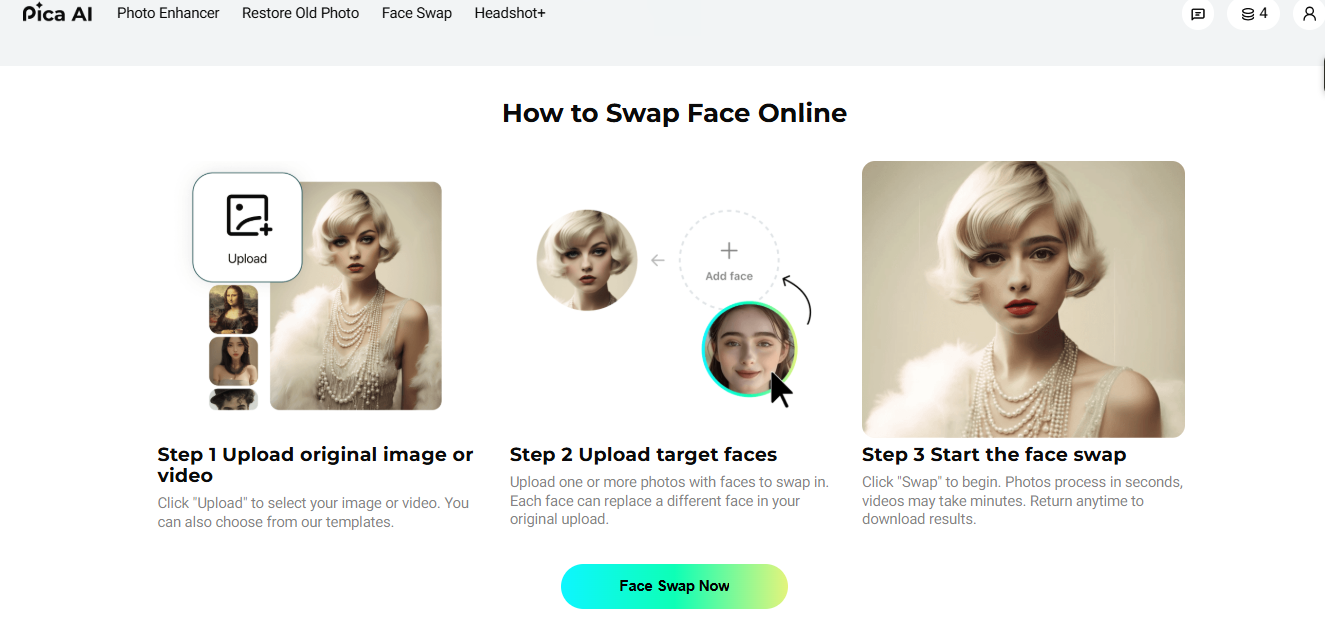
How do I perform a face swap?
Upload your original photo or video, then upload the face image you want to use and select the Swap option. Pica AI processes the files and lets you download the resulting image or video.
What output formats are supported?
For face-swap video results, Pica AI currently states that users can download creations as GIF or MP4 files. Supported input and output formats can vary depending on the specific AI tool.
Is my uploaded data private?
Pica AI states that it does not sell users’ photos or videos and does not use uploaded photos and videos to train its AI technologies. Its privacy policy also describes security measures and gives users control over uploaded content, although generated content may be used for service improvement under its policies.
Conclusion
Pica AI fits into a broader movement toward AI-assisted visual creation. Its potential value lies not just in producing an image or visual asset, but in helping creators explore ideas, experiment with alternatives, and reduce some of the repetitive parts of the production process.
However, effective creative work still requires human involvement. AI-generated results need to be reviewed, improved, and evaluated against the project’s goal.
For creators, the most practical approach is to consider Pica AI as a component of a larger workflow. Used thoughtfully, AI can speed up experiences by leaving critical creative and editorial decisions in human hands.
Key Takeaways
- Pica AI is part of the growing AI-assisted visual content ecosystem.
- AI can help creators move from ideas to visual concepts more quickly.
- Photo and video workflows can benefit from a faster experience.
- AI-generated content still requires human review and refinement.
- Accuracy, privacy, licensing, and usage rights must be considered.
- AI works best as a creative assistant rather than a complete replacement for human expertise.