

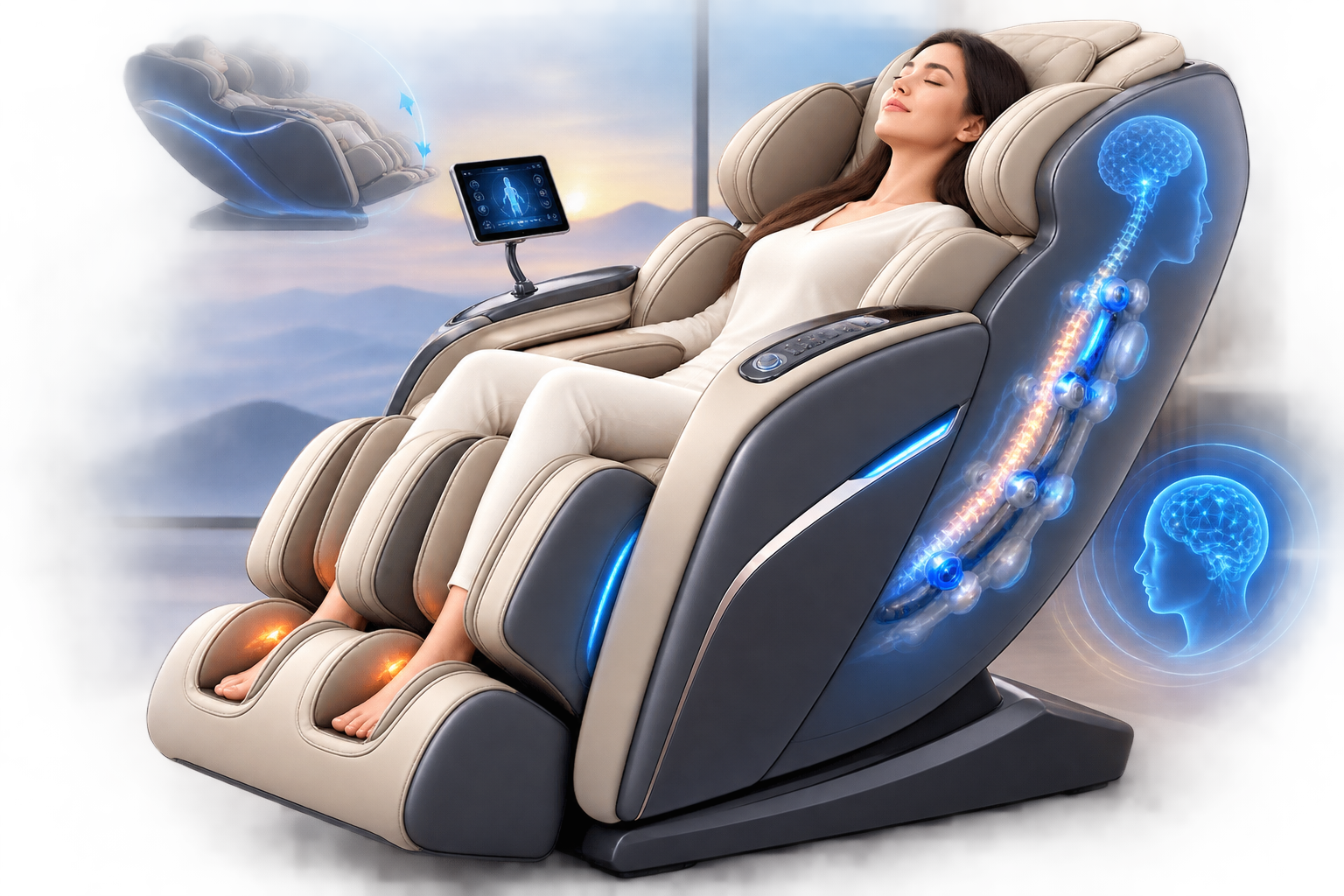

The Synca Wellness JP3000 5D AI Deluxe Zero Gravity Massage Chair is a premium Japanese massage chair built for users who want a highly customizable full-body massage experience at home. It combines advanced 5D AI massage technology, intelligent body scanning, automatic massage programs, manual massage controls, Zero Gravity reclining, air compression, foot rollers, heat therapy, stretching functions, Bluetooth audio, and personalized user settings.
Rather than providing the same massage pattern for everyone, the JP3000 is designed to detect the user’s body position and adjust the massage experience accordingly. This makes it suitable for households where different users have different heights, body shapes, pressure preferences, and relaxation needs.
This complete guide covers the JP3000’s major features, controls, massage programs, customization options, daily operation, cleaning, maintenance, and important safety considerations.
Synca Wellness JP3000 Key Features
The JP3000 includes an extensive collection of premium massage-chair features:
- Advanced 5D AI massage technology
- AI-assisted body scanning
- Double Sensing body detection
- 38 automatic massage programs
- Up to 98 massage techniques and combinations
- Multiple massage intensity levels
- Whole, partial, and point massage
- Zero Gravity positioning
- Powered backrest reclining
- Full-body air compression
- Shoulder and arm massage
- Waist and hip compression
- Thigh and calf massage
- Foot and ankle compression
- Dedicated foot rollers
- Back heating
- Foot heating
- Full-body stretching programs
- Adjustable footrest
- Motorized and spring-assisted leg extension
- Two personalized user profiles
- Bluetooth audio
- Built-in speakers
- Voice guidance
- Touchscreen-style controller
- Japanese engineering and construction
Together, these functions make the JP3000 more than a simple massage recliner. It is designed as a comprehensive home massage system with considerable control over how each session feels.
5D AI Massage Technology
One of the most important features of the Synca Wellness JP3000 is its 5D AI massage system.
Basic massage chairs typically use rollers that move vertically and horizontally. More sophisticated systems add adjustable depth, speed, rhythm, and pressure.
The JP3000’s 5D system is designed to create more varied roller movements and changes in speed so the massage feels less mechanical.
Depending on the selected program, the chair can combine movements such as kneading, tapping, rolling, shiatsu-style pressure, spiral movements, and other massage patterns.
How to Use 5D Massage
Start by sitting completely against the backrest.
Turn on the chair and select an automatic massage program.
Remain still while the chair completes its body scan.
Once the scan is complete, allow the selected program to begin. You can then adjust the available massage intensity according to your comfort level.
New users should begin at a lower or moderate setting before experimenting with stronger massage.
Intelligent AI Body Scanning
A massage chair cannot provide an effective personalized experience if the rollers are incorrectly positioned.
The JP3000 therefore uses an intelligent body-detection system to identify important areas such as your shoulders and the natural shape of your back.
The system analyzes your seated position before beginning compatible automatic programs.
This allows the massage mechanism to better match different heights and body shapes.
How to Use the Body Scan
Sit naturally with your back fully against the chair.
Position your head against the headrest and place both feet correctly inside the footrest.
Choose your desired automatic massage program.
Remain reasonably still while the scanning process takes place.
Once your shoulder position is detected, check whether the massage rollers feel correctly positioned around your shoulders.
If they appear too high or too low, use the available shoulder-position adjustment or re-detection controls before continuing.
Taking a few extra seconds to correct the scan can make a significant difference to the overall massage experience.
38 Automatic Massage Programs
The JP3000 includes 38 automatic massage programs, giving users a wide range of preconfigured experiences.
Instead of manually selecting every movement, intensity, body area, and compression setting, you can select a program and allow the chair to manage the massage sequence.
Available program categories include options focused on relaxation, rejuvenation, stretching, specific body areas, mindfulness, conditioning, and shorter massage sessions.
Depending on the selected mode, programs may combine roller massage, reclining, air compression, foot massage, and other functions.
How to Start an Automatic Program
- Sit properly inside the chair.
- Turn the chair on.
- Open the automatic massage menu.
- Select the desired program.
- Allow the body scan to finish.
- Check your shoulder position.
- Adjust intensity if necessary.
- Relax while the chair completes the program.
Automatic programs are the easiest place to start if you have never used the JP3000 before.
Manual Massage Controls
Experienced users may want more control than an automatic program provides.
The JP3000 includes manual massage options that allow you to customize the massage around your preferences.
Depending on the selected function, you can change the massage technique, massage position, range, and intensity.
Whole Massage
Whole massage allows the mechanism to travel across a broader section of your back.
This is useful when you want general relaxation rather than focusing on one location.
Partial Massage
Partial massage limits the roller movement to a smaller region.
It can be useful when you want extra attention around a particular section of your back.
Point Massage
Point massage keeps the mechanism concentrated around a selected location.
Use this when you want a more targeted massage experience.
Adjustable Massage Intensity
Massage pressure is highly personal.
A setting that feels comfortable for one person may feel too strong for another.
The JP3000 therefore provides multiple massage intensity levels, including up to seven levels for supported massage functions.
Beginners should generally start around the lower or middle range.
Increase the intensity gradually rather than immediately choosing the strongest level.
A massage should feel comfortable and controlled. Stop or reduce the intensity if you experience pain or significant discomfort.
Zero Gravity Reclining
The Zero Gravity function is another major feature of the JP3000.
Zero Gravity positioning reclines your upper body while raising and supporting your legs. This creates a relaxed seated position and can also change how your body contacts the massage rollers.
The JP3000 provides powered reclining, allowing you to adjust the chair without manually moving the backrest.
How to Use Zero Gravity
Sit completely inside the chair.
Make sure your arms and legs are properly positioned.
Use the recline or positioning controls to move the chair into the desired position.
Allow the backrest and leg section to finish moving before making further adjustments.
Choose the position that feels most comfortable for your body.
Never attempt to get out of the chair while the backrest or footrest is actively moving.
Full-Body Air Compression Massage
Massage rollers primarily work around the back, while air cells allow the JP3000 to massage additional areas.
The air-compression system can provide controlled squeezing around several parts of the body, including the:
- Shoulders
- Arms
- Waist
- Pelvis
- Hips
- Thighs
- Calves
- Ankles
- Feet
Air cells inflate and deflate according to the selected program and pressure level.
How to Adjust Air Compression
Open the air-massage controls.
Select the body areas you want to activate.
Choose your preferred air-pressure level.
Begin with lower compression if you are unfamiliar with the sensation.
Increase the pressure gradually until it feels comfortably supportive.
Shoulder and Arm Massage
The JP3000 uses air compression around the shoulders and arms to complement its back massage.
Place your arms correctly inside the designated arm sections before starting the session.
The air cells will inflate and release according to your chosen program.
If the pressure feels excessive, reduce the air intensity rather than removing your arms abruptly during active compression.
Waist, Hip, and Thigh Massage
Air compression is also used around the waist, pelvic area, hips, and thighs.
This helps create a more complete massage experience instead of concentrating entirely on the upper body.
Some automatic and stretching programs coordinate these air cells with movement from the backrest and massage mechanism.
Calf and Ankle Massage
The lower-leg section surrounds the calves and ankles with air cells.
These cells inflate and release to produce a compression-style massage around the lower legs.
Users who find the compression too strong should decrease the air-pressure level.
Correct leg placement is also important. Make sure your legs sit naturally inside the leg massage section rather than forcing them into an uncomfortable position.
Advanced Foot Roller Massage
The JP3000 includes dedicated massage rollers underneath the feet.
These rollers work across the soles while surrounding air cells provide additional compression.
This combination creates a more comprehensive foot massage than air compression alone.
How to Use the Foot Rollers
Place both feet completely inside the footrest.
Activate an automatic program that includes foot massage or select the appropriate foot massage control.
Choose your desired roller intensity.
Start at a lower level during your first few sessions.
Increase the intensity only when you know how the foot rollers feel.
Because the soles can be sensitive, maximum intensity is not necessary for an effective massage experience.
Adjustable Footrest and Leg Extension
People have different leg lengths, so a fixed footrest can make a massage chair uncomfortable for taller or shorter users.
The JP3000 addresses this with an adjustable footrest incorporating motorized and spring-assisted extension.
The extension range helps accommodate users of different heights while maintaining appropriate leg and foot positioning.
Adjusting the Footrest
Sit naturally against the backrest.
Place your feet inside the foot section.
Use the available leg or footrest adjustment controls.
Extend or retract the section until your knees, calves, ankles, and feet feel naturally positioned.
Avoid forcing the footrest beyond its normal operating range.
Back Heat Therapy
The JP3000 includes heating around the back area.
Heat can be used alongside massage to create a warmer and more relaxing experience.
Rather than treating heat as a replacement for roller massage, think of it as a complementary comfort function.
Using Back Heat
Select your massage program.
Activate the heating function.
Allow several minutes for the warmth to become noticeable.
If the heat becomes uncomfortable, switch the function off.
Users who are sensitive to heat should use additional caution.
Foot Heating
Heat is also available around the foot area.
Combining foot rollers, air compression, and warmth can create a particularly relaxing lower-body massage experience.
The function can be useful when you prefer a warm massage environment, especially during colder months.
Stretching Programs
The JP3000 includes dedicated stretching functions that combine chair movement, roller massage, and air compression.
Rather than remaining completely stationary, different sections of your body can be held or supported while the chair changes position.
Available options include whole-body and targeted stretching experiences.
How to Use Stretching Programs
Position yourself correctly in the chair.
Choose a stretching program.
Make sure your feet, legs, arms, and shoulders are properly placed.
Start with a moderate intensity.
Allow the chair to control the stretching movement.
Do not resist the chair’s movement or attempt to force your body beyond a comfortable range.
Stop the program if any movement causes pain.
Personalized Settings for Two Users
The JP3000 can store customized information for two users.
This is especially useful for couples or households where two people regularly use the chair.
Personalized settings can help the chair remember certain preferences and positioning information instead of requiring the same adjustments every time.
For example, one person may prefer stronger air compression and a deeper recline while another prefers lighter pressure.
Bluetooth Audio and Built-In Speakers
Massage is often more relaxing when combined with music or calming audio.
The JP3000 includes Bluetooth capability and built-in speakers.
You can connect a compatible smartphone or Bluetooth device and listen to:
- Relaxing music
- Meditation audio
- Podcasts
- Audiobooks
- Nature sounds
- Personal playlists
How to Connect Bluetooth
Turn on Bluetooth on your phone or compatible device.
Open the Bluetooth device list.
Select the massage chair when it appears.
Complete the pairing process.
Play your preferred audio and adjust the volume to a comfortable level.
The exact device name displayed during pairing may depend on the chair’s configuration.
Voice Guidance
With dozens of programs and customization options, operating an advanced massage chair can initially feel complicated.
Voice guidance helps simplify the experience by providing audible information during operation.
Voice volume can also be adjusted, allowing you to choose a comfortable level or reduce the guidance when you already understand the controls.
Touchscreen-Style Controller
Most of the JP3000’s functions are managed through its controller.
You can use it to access automatic programs, manual massage, massage intensity, air pressure, foot massage, heating, reclining, positioning, and other available functions.
For first-time owners, it is better to learn the controller gradually.
Start with automatic massage programs. Once you understand the chair, experiment with manual massage and individual settings.
Complete Step-by-Step Guide to Using the Synca JP3000
Step 1: Check the Chair
Before every session, quickly inspect the chair.
Make sure nothing is trapped behind the backrest or underneath the footrest.
Check that the upholstery appears normal and the power cable is properly connected.
Step 2: Sit Correctly
Sit completely against the backrest.
Place your head naturally against the headrest.
Position your arms in the arm sections and both legs inside the leg massager.
Your feet should sit naturally inside the footrest.
Step 3: Turn the Chair On
Switch on the main power and activate the controller.
Wait for the chair to become ready.
Step 4: Select Your Massage
First-time users should choose an automatic relaxation or softer massage program.
Experienced users can select more intensive programs or manual controls.
Step 5: Complete the Body Scan
Remain still while the chair scans your body.
Pay particular attention to the detected shoulder position.
Adjust it if necessary.
Step 6: Choose Your Reclining Position
Use the recline controls to find a comfortable position.
Try Zero Gravity if you want a more deeply reclined massage experience.
Step 7: Adjust Massage Intensity
Start at a lower or moderate level.
Increase pressure gradually.
Step 8: Set Air Compression
Choose which body areas receive air massage and adjust the compression level.
Step 9: Adjust the Foot Massage
Select your preferred foot-roller intensity.
Remember that foot rollers can feel stronger than back massage rollers.
Step 10: Add Heat
Activate back or foot heat when you want a warmer massage experience.
Step 11: Add Audio
Connect your smartphone through Bluetooth and play relaxing audio if desired.
Step 12: Enjoy the Session
Allow the program to run while keeping your body comfortably positioned.
If anything becomes uncomfortable, reduce the intensity or stop the program.
Step 13: Finish Safely
When your session ends, allow the chair to return to a safe position.
Wait until moving components stop before removing your feet or standing up.
Cleaning the JP3000
Regular cleaning helps preserve the appearance and condition of your massage chair.
For general surfaces, use a soft cloth.
For suitable upholstery areas requiring additional cleaning, use a lightly dampened cloth with a mild neutral cleaning solution. Follow with a clean damp cloth and then wipe dry.
Allow surfaces to dry naturally before using the chair.
The controller and electrical areas should generally be cleaned with a dry, soft cloth.
Avoid harsh solvents, alcohol-based products, paint thinner, benzine, abrasive cleaners, or excessive water.
Never allow liquid to enter the controller, electrical connections, ventilation areas, or internal mechanisms.
Routine Maintenance
Regularly check:
- Upholstery condition
- Power cable
- Plug
- Footrest
- Arm sections
- Moving components
- Controller
- Air massage sections
- Areas around the massage rollers
Do not continue using the chair if you discover damaged upholstery that exposes internal moving components.
Unusual noises, electrical smells, damaged cables, uncontrolled movements, or repeated operating errors should be investigated before further use.
Professional servicing is preferable to attempting to open or repair internal electrical and mechanical components yourself.
Important Safety Tips
The JP3000 contains powerful rollers, air cells, heating elements, and motorized moving components.
Always use it according to the manufacturer’s operating instructions.
Do not allow children to operate the chair unsupervised.
Do not place hands or objects inside mechanical openings.
Keep the area behind and around the chair clear when reclining.
Never stand or sit on the footrest.
Avoid getting into or out of the chair while it is moving.
Do not use excessive massage intensity simply because a higher setting is available.
If you experience unusual pain, numbness, dizziness, discomfort, or other concerning symptoms, stop the session.
People who are pregnant or who have injuries, implanted medical devices, cardiovascular or circulation concerns, bone or joint conditions, reduced sensation, recent surgery, or other medical conditions should seek guidance from an appropriate healthcare professional before using massage, compression, stretching, or heat functions.
Who Should Consider the Synca Wellness JP3000?
The JP3000 is particularly well suited to users looking for a premium massage chair with extensive customization.
It may appeal to people who want:
- A sophisticated full-body massage experience
- Multiple automatic programs
- Strong manual customization
- Adjustable massage pressure
- Zero Gravity reclining
- Foot and calf massage
- Air compression
- Stretching programs
- Back and foot heat
- Different settings for multiple users
- Japanese massage-chair engineering
- Bluetooth entertainment
Users seeking only a simple vibration chair may find its extensive functionality unnecessary.
Final Verdict
The Synca Wellness JP3000 5D AI Deluxe Zero Gravity Massage Chair is designed to provide a highly customizable massage experience through a combination of advanced roller technology and full-body comfort features.
Its biggest strength is how many systems work together.
The 5D AI massage mechanism handles the primary back massage, while intelligent body scanning helps align the rollers with the user. Air compression expands the massage to the shoulders, arms, waist, hips, thighs, calves, ankles, and feet.
Dedicated foot rollers add focused sole massage, while back and foot heating provide additional warmth. Zero Gravity reclining changes the user’s position for a more relaxed experience, and stretching programs provide another alternative to conventional massage sessions.
With 38 automatic programs, extensive massage techniques, multiple intensity levels, personalized user settings, Bluetooth audio, voice guidance, heat, stretching, and advanced foot massage, the JP3000 offers enough flexibility for users to create very different experiences from the same chair.
The best way to use it is to start simple. Begin with an automatic program, allow the body scan to correctly locate your shoulders, use moderate massage and air pressure, and then gradually explore Zero Gravity, manual massage, foot rollers, stretching, heat, and personalized settings.
By learning each function rather than immediately using every feature at maximum intensity, owners can get considerably more value from the Synca Wellness JP3000 5D AI Deluxe Zero Gravity Massage Chair while maintaining a comfortable and controlled massage experience.
Frequently Asked Questions
Does the Synca JP3000 have Zero Gravity?
Yes. The JP3000 includes powered reclining and Zero Gravity positioning for a more supported and relaxing massage position.
How many automatic programs does the JP3000 have?
The chair offers 38 automatic massage programs, providing a wide variety of massage experiences without requiring users to manually configure every setting.
What does 5D massage mean on the JP3000?
The 5D massage system uses sophisticated roller movement, pressure, rhythm, speed, and positioning changes to create a more varied and natural-feeling massage experience.
Does the JP3000 scan your body?
Yes. It uses advanced body-detection technology to identify your back shape and shoulder position so the massage mechanism can better align itself with your body.
Can massage intensity be changed?
Yes. Supported massage functions provide multiple intensity levels, allowing users to choose anything from a gentler experience to stronger stimulation.
Does the JP3000 massage your feet?
Yes. The chair combines dedicated sole rollers with air compression around the feet, ankles, and lower legs.
Does the JP3000 provide heat?
Yes. Heating is available for the back and foot areas.
Can I target one area of my back?
Yes. Manual controls allow compatible massage functions to operate across whole, partial, or point-focused areas.
Can two people save their preferences?
Yes. The JP3000 supports personalized information for two users, making it convenient for households where more than one person regularly uses the chair.
Does the JP3000 have Bluetooth?
Yes. Bluetooth connectivity allows compatible devices to play music and other audio through the chair’s built-in speaker system.
Is the Synca JP3000 suitable for first-time massage-chair users?
Yes, but beginners should start with automatic programs and lower or moderate intensity settings. The more advanced manual features can be explored after becoming familiar with how the chair feels and operates.
How should the JP3000 be cleaned?
Use soft cloths and mild cleaning methods suitable for the chair’s surfaces. Keep excessive moisture away from electrical components and avoid strong solvents or abrasive cleaning products.
How often should I use the JP3000?
Usage should remain within the manufacturer’s recommended session duration and frequency. Individual comfort and health circumstances also matter, so users should avoid excessive or prolonged massage sessions.
Is the strongest massage setting always better?
No. Stronger pressure does not automatically mean a better massage. Choose an intensity that feels comfortable and reduce or stop the massage if you experience pain or significant discomfort.